Apple Sony Ericsson XPERIA X10 Unlocked GSM Smartphone with 8 MP Camera Android OS Touch Screen WiFi a (IPADWIFI16GB3GMB292DA) Tablet PC Logo
Posted on Feb 07, 2011
Answered by a Fixya Expert

Trustworthy Expert Solutions

At Fixya.com, our trusted experts are meticulously vetted and possess extensive experience in their respective fields. Backed by a community of knowledgeable professionals, our platform ensures that the solutions provided are thoroughly researched and validated.

View Our Top Experts

I for got my passcode how do i unlock it it makes me wait 60min before i can try another passcode

1 Answer

Anonymous

Level 2:

An expert who has achieved level 2 by getting 100 points

MVP:

An expert that got 5 achievements.

Governor:

An expert whose answer got voted for 20 times.

Scholar:

An expert who has written 20 answers of more than 400 characters.

  • Expert 59 Answers
  • Posted on Mar 06, 2011
Anonymous
Expert
Level 2:

An expert who has achieved level 2 by getting 100 points

MVP:

An expert that got 5 achievements.

Governor:

An expert whose answer got voted for 20 times.

Scholar:

An expert who has written 20 answers of more than 400 characters.

Joined: Mar 06, 2011
Answers
59
Questions
0
Helped
36568
Points
120

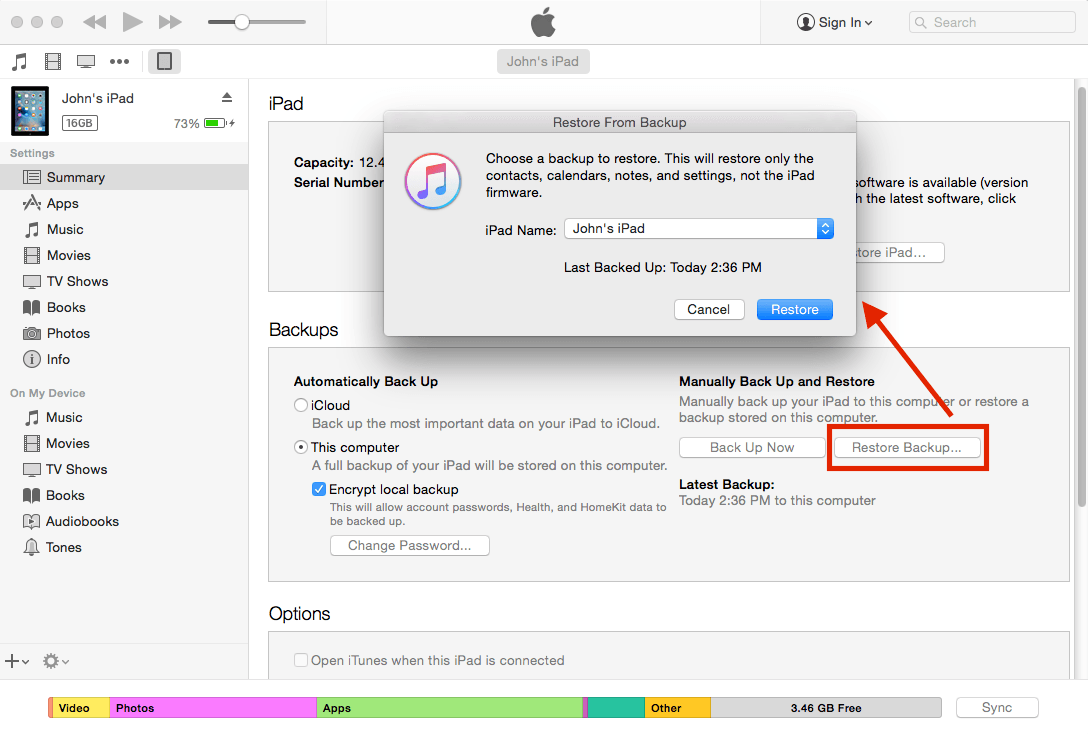
You need to plug it in to the computer you sync it with, and open up iTunes. You then need to Restore the iPad from a previous backup, when you didn't have the passcode enabled.
Unfortunately this is the only way of doing it, without completely wiping the iPad! It does ensure the security of your data though.
Hope that helped!

Add Your Answer

×

Uploading: 0%

my-video-file.mp4

Complete. Click "Add" to insert your video. Add

×

Loading...
Loading...

Related Questions:

0helpful
2answers

I forgot my ipad passcode and never synced to a computer

If you forgot your iPad passcode and never synced it with a computer, don't worry - you can still unlock it. The only official solution is to erase the iPad and set it up again, because Apple cannot bypass the passcode without wiping the device for security reasons. Here are the working methods: Method 1: Use iPad Recovery Mode
Step 1 - Turn Off the iPad
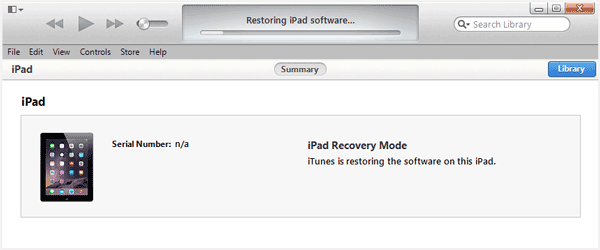
Step 2 - Put iPad into Recovery Mode
For iPads with Home button
Hold Home button while connecting to the computer.
Keep holding until recovery screen appears.
For iPads without Home button
Hold Top button while connecting to the computer.
Keep holding until recovery screen appears.
You'll see a computer + cable icon.
Step 3 - Restore the iPad
Open Finder or iTunes.
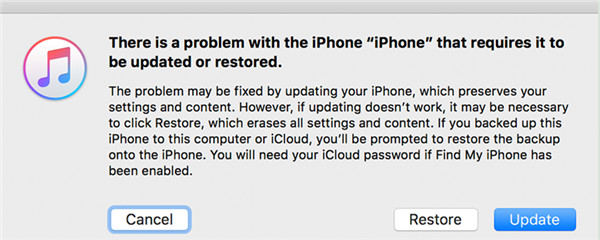
A message appears saying:"There is a problem with the iPad..."
Click Restore (NOT Update).
Method 2: Use Third-party Tool Like TunesKit iPhone Unlocker It is an unlock tool for unlocking iPhone screen lock without passcode wtih a few clicks. main-interface-tjcucf33m5ls2riadgag3o1k-d-0.jpg
0helpful
1answer

How do you get a passcode off a prestige elite 8 QI tablet?

If you forgot the passcode to unlock your Prestige Elite 8QI tablet, you can try the following methods:
  1. Use Google account: If your tablet is linked to a Google account, you can try to unlock it using the associated Google account credentials. On the lock screen, tap "Forgot Pattern" or "Forgot Password" and follow the instructions to enter your Google account username and password.
  2. Factory reset: If the above method doesn't work, you can perform a factory reset on your tablet to remove the passcode. Please note that this will erase all data on your tablet, so make sure to back up your files before proceeding.
To factory reset your Prestige Elite 8QI tablet, follow these steps:
  • Power off your tablet.
  • Press and hold the Volume Up button and the Power button at the same time until the logo screen appears.
  • Release the Power button but continue holding the Volume Up button until the Android System Recovery menu appears.
  • Use the Volume buttons to navigate to "Wipe data/factory reset" and press the Power button to select it.
  • Use the Volume buttons to navigate to "Yes -- delete all user data" and press the Power button to confirm.
  • Once the reset process is complete, use the Volume buttons to navigate to "Reboot system now" and press the Power button to restart your tablet.
Your Prestige Elite 8QI tablet should now be unlocked and ready to use.
0helpful
1answer

Cannot open ipad asking for a pass code and says ipad has not been updated

You can try the default password or just remove the password. Follow below steps to do that.

Generally, the default passcode can be 1234 or 123456, and the digits rely on the blank number.

If this won't work, try below method.

When you find "iPad asking for passcode I never set", it is sensible for you to remove iPad passcode by restoring iPad with iTunes. The precondition is that you have backed up your iPad to iTunes before you forgot the passcode. Now let's begin to see how to get this work done.
1. Run the latest version of iTunes on your computer and then make sure that you do not connect your iPad with your computer.
2. For iPad with Face ID, you need to press and hold the top button or the volume button till you see the slider of power off shows up on the screen. Drag the slider from left to right to turn off your iPad. After that, plug your iPad into computer while holding the top button. You need to hold it until the recovery-mode screen appears.
For iPad with home button, you need to press and hold the slide or top button till you see the power off slider interface. Drag the slider from left to right to turn off your iPad. Afterwards, you need to insert your iPad into computer with proper USB cable while holding the home button. You need to hold the button until the recovery-mode screen displays.
3. In the interface of iTunes, you will see a dialogue for you to restore or update, you need to choose the option of "Restore" in the panel. Thus, iTunes will download program for your iPad. You need to wait for over 15 minutes until your iPad exit the recovery mode. Thus, you need to repeat steps 2-4.

4. Wait for the end of the procedure to set up and use your iPad without a passcode.
The process to remove iPad passcode via restoring iPad with iTunes is not so hard for you at all. You can give it a go to help you to pass through the passcode inquiry simply.

For more details, check: Fixed: iPad Asking for Passcode I Never Set
0helpful
1answer

How do i unlock my pass code

Do you want to unlock mobile passcode ? Do you want to remove carrier lock passcode from your phone ? If so, whats your mobile brand and model ? to unlock your phone, use unlock code . You can get it from any of the online vendors like WickedUnlock.com to unlock it .
0helpful
1answer

How can I login to my iPad when the passcode isn't working?

You have to reset your iPad. Just follow below steps.

How to unlock iPad without password or how to unlock disabled iPad? It is a good habit to have your iPad backed up regularly. In case of your iPad is locked, disabled or being stolen, you can easily recover your data from it. Otherwise, you'll lose all the data. To unlock iPad screen without password or to unlock disabled iPad mean you have to remove your previous pass code and restore your iPad. Here we introduce three methods which you can follow.
Method One: How to unlock iPad without password using iTunes
  • 1. Connect iPad to the computer you have synced with.
  • 2. Open iTunes on your computer and connect it with your iPad. If fortunate, you can enter the iTunes without password. But in most cases, there would be prompt asking for a pass code. Try another computer you've synced with, or use recovery mode. (The recovery mode will be mentioned in method three.)
  • 3. Find your iPad in summary and make a manual backup. Once the backup have finished, click Restore your iPad with the most relevant back-up.

Method Two: How to unlock iPad screen without password with iCloud
You can also use iCloud to remove your password and recover your data if you have backed up before it was locked. And it is in the premise that you have set up Find My iPhone on your iPad, and you did remember your Apple ID, you can use iCloud to unlock your iPad.
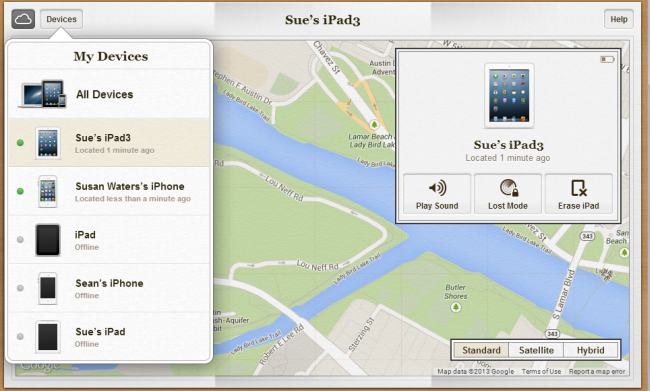
  • 1. Open your laptop or computer, go to icloud.com/find or open the iCloud app.
  • 2. If the sign-in window pops up, just sign in with your Apple ID.
  • 3. There's an All Devices button at the top-left of the window, click on it to call out a drop-down menu and choose your iOS device.
  • 4. Click Erase (your device) in the prompt to finalize the process.
  • 5. Now you can either recovery data to your device from a backup or set up as new if there isn't any back-up before.


Method Three: How to unlock a disabled iPad in recovery mode?
If you've neither synced with iTunes nor set up Find My iPhone in iCloud, you'll need to wipe your iPad to factory setting to remove the password, which means you'll suffer losing all your data on iPad and get it as a new one.
Please pay attention there is a slight difference in putting different models of iPad into recovery mode.
iPad Air
  • 1. Turn off your iPad Air, press and hold the Home button.
  • 2. While holding the Home key, connect the USB cable to the device. Wait until the Apple logo appears and keep holding the Home button for few more seconds.
  • 3. Continue holding the Home button until the iTunes logo appears.
iPad mini/iPad pro
  • 1. Connect your iPad to your computer or laptop and open iTunes.
  • 2. While your device is connected, force to restart it.
  • 3. Press and hold the Sleep/Wake and Home buttons at the same time. Don't release when you see the Apple logo. Keep holding both buttons until you see the recovery mode screen.
Now you have entered the recovery mode, and

1. When you see the option to Restore and Update, click it.

2. Wait for the process to finish. Then you can set up and use your device.
itunes-summary-4wdcyutupah1kirb0sfrwsm2-1-0.png For more details, check: How to Unlock iPad without Passcode
0helpful
1answer

The front srceen wont unlock

Try unlocking with your Email Account. or the Security Answer that possibly you know.
if you have a back-up of your data then i suggest you to re-install your Operating System (Most Economic Plan)
If all else fails, please visit sites like Mobile Madness, it might cost about $10-$15 to unlock.
Good luck!
0helpful
2answers

I forgot my passcode to unlock it to get to my home screen

The solution i a little brutal :(

input random passcodes (3 or 4 times) until the Fire gives up and warns you that it will reset to Factory Defaults.

This will reset your Fire to how it was when it was made so you will need to:
Find your wifi connection again;
Register your Fire to your Amazon account again.
Download any of your Amazon books or Apps again from your Amazon cloud (Don't worry, you don't have to buy them again, just download them.)
0helpful
1answer

I need a passcode to connect to my phone and I don't have one

make sure phone is set to discoverable in bluetooth settings and it should give you a passcode for the other device tryin g to connect
2helpful
1answer

Forgot restriction passcode on apple iPad 2

There is no way to unlock it as a passcode also prevents other people from unlocking it to access your data. What you could do is put it into recovery mode and then do a restore which will wipe all data, assuming you have a backup, you can just restore the data.
Not finding what you are looking for?

437 views

Ask a Question

Usually answered in minutes!

Top Apple Tablets & eReaders Experts

john h

Level 3 Expert

29497 Answers

Rob Hill
Rob Hill

Level 3 Expert

1483 Answers

ADMIN Andrew
ADMIN Andrew

Level 3 Expert

73783 Answers

Are you an Apple Tablet and eReader Expert? Answer questions, earn points and help others

Answer questions

Manuals & User Guides

Loading...