

OK here is the codes
Error 6A00
The 6A00 is a Canon generic code for paper path jam.
Solution 1:
Move the printhead carriage back and forth a few times.
Solution 2:
Check the purge unit: Moving the print head assembly will not clear a purge unit if its jammed with paper, paper clips, push pins, screws, cookie crisp, flower bud pods or the like.
Solution 3:
Press the ink pads down in the purge unit.
Please come back and just gave a vote, it will gave me some satisfaction to know am helping some one so I will keep on helping.
All The Best: Pineworks
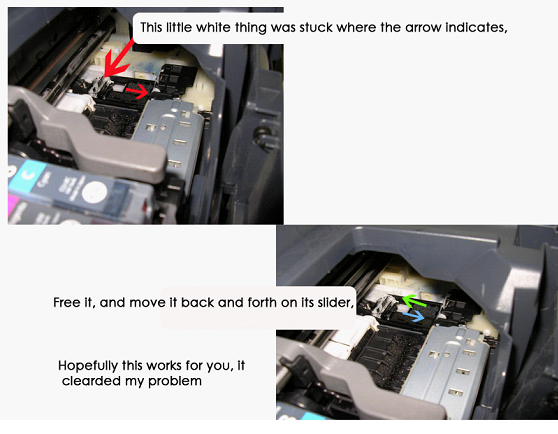
Solution Canon Pixma IP4300 Error 6A00, this
reset tips is from someone in printer forum but the tutorial in
picture. You can follow the instruction in the picture to solve error
6A00 in Canon iP4300. Some users say on the forum this reset method also
work on Canon iP4200 and Canon MP800. Look the picture below to view
the complete tutorial how to solve Error 6A00
Larger picture here
146 views
Usually answered in minutes!


×