Apple iPod touch Logo

Related Topics:

Posted on Mar 09, 2009
Answered by a Fixya Expert

Trustworthy Expert Solutions

At Fixya.com, our trusted experts are meticulously vetted and possess extensive experience in their respective fields. Backed by a community of knowledgeable professionals, our platform ensures that the solutions provided are thoroughly researched and validated.

View Our Top Experts

Can not enter passcode - Apple iPod touch

1 Answer

Anonymous

Level 2:

An expert who has achieved level 2 by getting 100 points

MVP:

An expert that got 5 achievements.

Governor:

An expert whose answer got voted for 20 times.

Hot-Shot:

An expert who has answered 20 questions.

  • Expert 70 Answers
  • Posted on Mar 09, 2009
Anonymous
Expert
Level 2:

An expert who has achieved level 2 by getting 100 points

MVP:

An expert that got 5 achievements.

Governor:

An expert whose answer got voted for 20 times.

Hot-Shot:

An expert who has answered 20 questions.

Joined: Feb 16, 2009
Answers
70
Questions
2
Helped
28557
Points
135

Restore it on a comp and try again this will fix ur problem :)

Add Your Answer

×

Uploading: 0%

my-video-file.mp4

Complete. Click "Add" to insert your video. Add

×

Loading...
Loading...

Related Questions:

0helpful
1answer

How do I remove my passcode?

(Assuming you're working from iOS 9.2 or recent versions)

From the home screen, swipe the screen down to start spotlight search.

Type "Settings" in to the search field.

Once settings opens swipe down slightly to reveal a search bar at the top of settings menu.

Type "Passcode" and select the third option down which is "turn passcode off".

Enter your passcode (re-enter if necessary).

Towards the bottom of the page select "Turn Passcode Off" and enter your passcode twice again.
0helpful
1answer

Can I make a new password

Yes, you can
Use passcode with your iPhone iPad or iPod touch
Set your Passcode
    1)Go to settings > Touch ID & Passcode. On devices without Touch ID, go to Settings > Passcode.
    2)Tap turn passcode on
    3)Enter a 6-digit passcode
    4)Enter passcode again to confirm Change passcode or passcode settings
    To change your passcode or passcode settings, go to Settings. Touch ID and passcode. On devices without touch ID, go to settings > passcode.

Nov 19, 2015 • Cell Phones
0helpful
2answers

How to reset restriction passcode

JUST RESTORE YOUR PHONE IN DFU MODE WITH LATEST UPDATE
ALL DATA WILL BE LOST SO BE SURE TO BACKUP ALL

FOR DFU MODE
CONNECT YOUR PHONE TO PC
HOLD POWER + HOME BUTTON WHEN SCREEN GOES OFF
COUNT UPTO 6 AND RELEASE POWER BUTTON WHILE HOLDING HOME BUTTON

0helpful
1answer

I need to disable the pass code on my iPhone 4s

1. Open "Settings App" on your iPhone
2. Then select "General" from left panel
3. Select "Passcode Lock" on right side. Enter your current passcode to continue.
4. Now tap on "Turn Passcode Off". Enter your current passcode to continue. Now Passcode lock will be turned off.
May 30, 2014 • Cell Phones
1helpful
1answer

My IPad has been hacked into I need to. Know how to change my password.

With the push of a button and pull of a slider, you can quickly access all of your iPad's contents, including any sensitive personal data that you've stored within it.

Such easy and unrestricted accessibility to your device could be dangerous in the hands of a stranger, which is why you enable a password to block its use by anyone but you.

If you believe that your password's confidentiality has been compromised, don't fret. You can change it using your iPad's Passcode Lock feature.

Tap "Settings" on the home screen.
Tap "General" on the left sidebar.


Tap "Passcode Lock" on the main pane to the right.
Type your current four-digit passcode in the "Enter Passcode" screen that appears.


Tap "Change Passcode." Type your current four-digit passcode again in the first "Change Passcode" screen that appears.


Enter a new four-digit passcode in the second "Change Passcode" screen.
Retype your new four-digit passcode in the third "Change Passcode" screen.

This will simultaneously verify and activate your new passcode.

http://support.apple.com/kb/HT4113
iOS: Using passcodes

http://support.apple.com/kb/ht1212
iOS: Forgotten passcode or device disabled after entering wrong passcode
0helpful
1answer

Disable password on my ipad

First of all, to turn off or change settings for the passcode lock feature on your iPad you must know your passcode. If you have forgotten your iPad passcode you're out of luck.
To turn off passcode lock:
1. Navigate to Settings -> General -> Passcode Lock
2. Enter your passcode.
3. Touch the top button labeled Turn Passcode Off.
4. Enter your passcode again.
The passcode is now deactivated and will not be required to accessicon1.png your iPad.
0helpful
1answer

How can i find my passcode restriction code on my iphone 4s

As for your issue, you can fix it with following instruction.
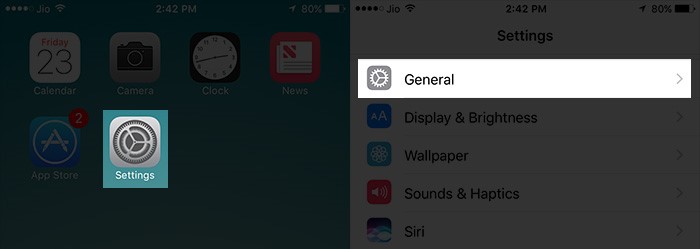
Step 1: Tap on Settings, then go to General.

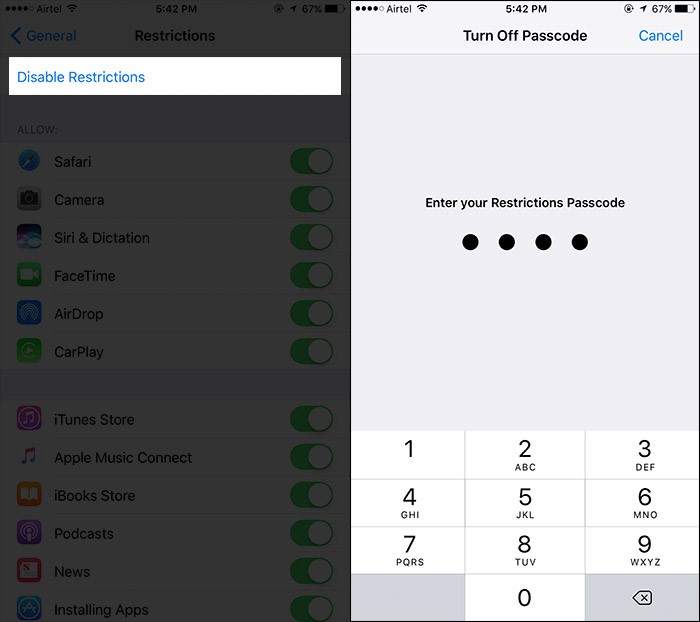
Step 2: Tap on Restriction, and enter your existing passcode.

Step 3: Tap on Disable Restrictions, and enter your existing passcode again.

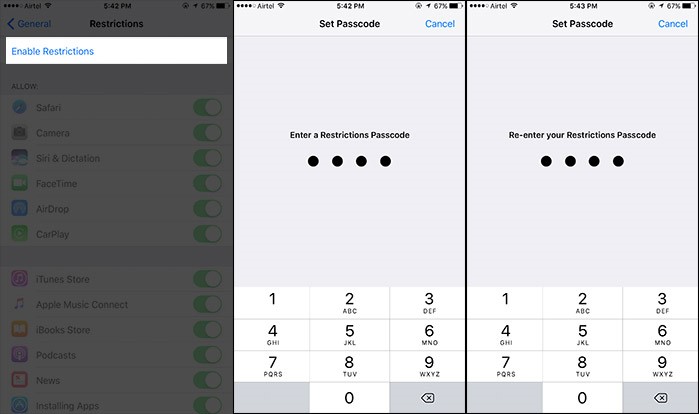
Step 4: Tap on Enable Restrictions, and enter (twice) new passcode.


For more details, check: How to Reset Restrictions Passcode on iPhone
1helpful
2answers

Forgot my passcode

Bad News... you may have to Restore from iTunes. Here is some info from the users manual:
Passcode Lock By default, iPhone doesn’t require you to enter a passcode to unlock it. Set a passcode: Choose General > Passcode Lock and enter a 4-digit passcode, then enter the passcode again to verify it. iPhone then requires you to enter the passcode to unlock it or to display the passcode lock settings.
Turn passcode lock off: Choose General > Passcode Lock, enter your passcode, and tap Turn Passcode Off, then enter your passcode again. Change the passcode: Choose General > Passcode Lock, enter your passcode, and tap Change Passcode. Enter your passcode again, then enter and reenter your new passcode.
If you forget your passcode, you must restore the iPhone software. See “Updating and Restoring iPhone Software” on page 204.
Set how long before your passcode is required: Choose General > Passcode Lock and enter your passcode. Tap Require Passcode, then select how long iPhone can be idle before you need to enter a passcode to unlock it.
0helpful
1answer

Need to have the serial number installed in machine.

To access the serial number from the Control Panel:
  1. Press the [Machine Status] button on the Control Panel. 'Machine Setup' will be displayed on the Display Screen.

    m20-cntl-pnl-status.jpg

  2. Press the [Up] or [Down] arrow button until 'System Admin Tools' is selected, and then press the [Enter] button.
  3. If the System Admin Tools has been passcode protected, 'Enter Passcode' will be displayed. Enter the passcode, and then press the [Enter] button. If the passcode is unknown, or has been forgotten, contact your System Administrator.

    If the System Admin Tools has not been passcode protected, 'Passcode Protect' will be displayed. Continue with step 4.

    NOTE: If the Enter button is pressed, 'Passcode Protect (No)' will be displayed. Press the Menu / Exit button to return to the previous screen, and then continue with step 4.

  4. Press the [Left] or [Right] arrow button until 'Maintenance' is displayed, and then press the [Enter] button.
  5. Press the [Left] or [Right] arrow button until 'Serial Number' is displayed, and then press the [Enter] button. The serial number will be displayed.
  6. If ther serial number is not diosplayed, enter it via the keypad.
Not finding what you are looking for?

57 views

Ask a Question

Usually answered in minutes!

Top Apple Audio Players & Recorders Experts

Grand Canyon Tech
Grand Canyon Tech

Level 3 Expert

3869 Answers

woodzowl307

Level 3 Expert

685 Answers

SmartAviator
SmartAviator

Level 3 Expert

1137 Answers

Are you an Apple Audio Player and Recorder Expert? Answer questions, earn points and help others

Answer questions

Manuals & User Guides

Loading...